Connect WhatsApp the approved way
ChatCart keeps Meta's official onboarding flow inside the setup journey so teams avoid unofficial workarounds.

ChatCart gives retailers, catalogue sellers, and owner-led teams one operating layer for conversations, products, order capture, payment follow-up, and structured reporting.
Built for WhatsApp-first sellers, from single shops to multi-branch businesses.
See the full operating flow clearly: a customer message becomes a shared team conversation, a product selection, an order, payment follow-up, and an owner summary without leaving one workspace.
ChatCart keeps Meta's official onboarding flow inside the setup journey so teams avoid unofficial workarounds.
Create the workspace, connect the number, add products, and test the flow without managing API infrastructure.
Daily, weekly, and monthly summaries keep owners close to revenue, orders, and conversion without manual chasing.
Keep replies, notes, and handovers visible to the team instead of leaving customer context trapped in one phone.
Use products, delivery fees, and order capture while the conversation is still active instead of jumping between tools.
Track pending, paid, and dispatched work with clear next steps instead of chasing proof and status in old chats.
The buyer browses a numbered catalogue, views a product, confirms the order, and hands clean order context to the seller. ChatCart then keeps payment and preparation visible through to dispatch.
 3 photos
Illustrative workspace using fictional customer and order details. The interface reflects the real ChatCart flow.
Enterprise gives ambitious businesses a richer catalogue and ordering experience, QR Ordering, branch-linked operations, and clear owner visibility. Start with one location or add branches as the business grows.
Customers can browse categories, view product details, build their cart, and continue their order through WhatsApp.
Create a QR code for each branch and place it on your shop door, counter, table, or marketing material. Customers can scan it to instantly browse your catalogue, build their order, and continue on WhatsApp.
See orders, paid revenue, pending payments, and activity per branch.
Enterprise is currently offered through guided onboarding and manual billing. We help prepare your storefront, QR Ordering, locations, shared WhatsApp flow, catalogue, and team access before going live.
ChatCart can turn live workspace activity into polished summaries that help owners see message flow, order output, revenue, conversion, repeat-customer movement, and paid-order health over time.
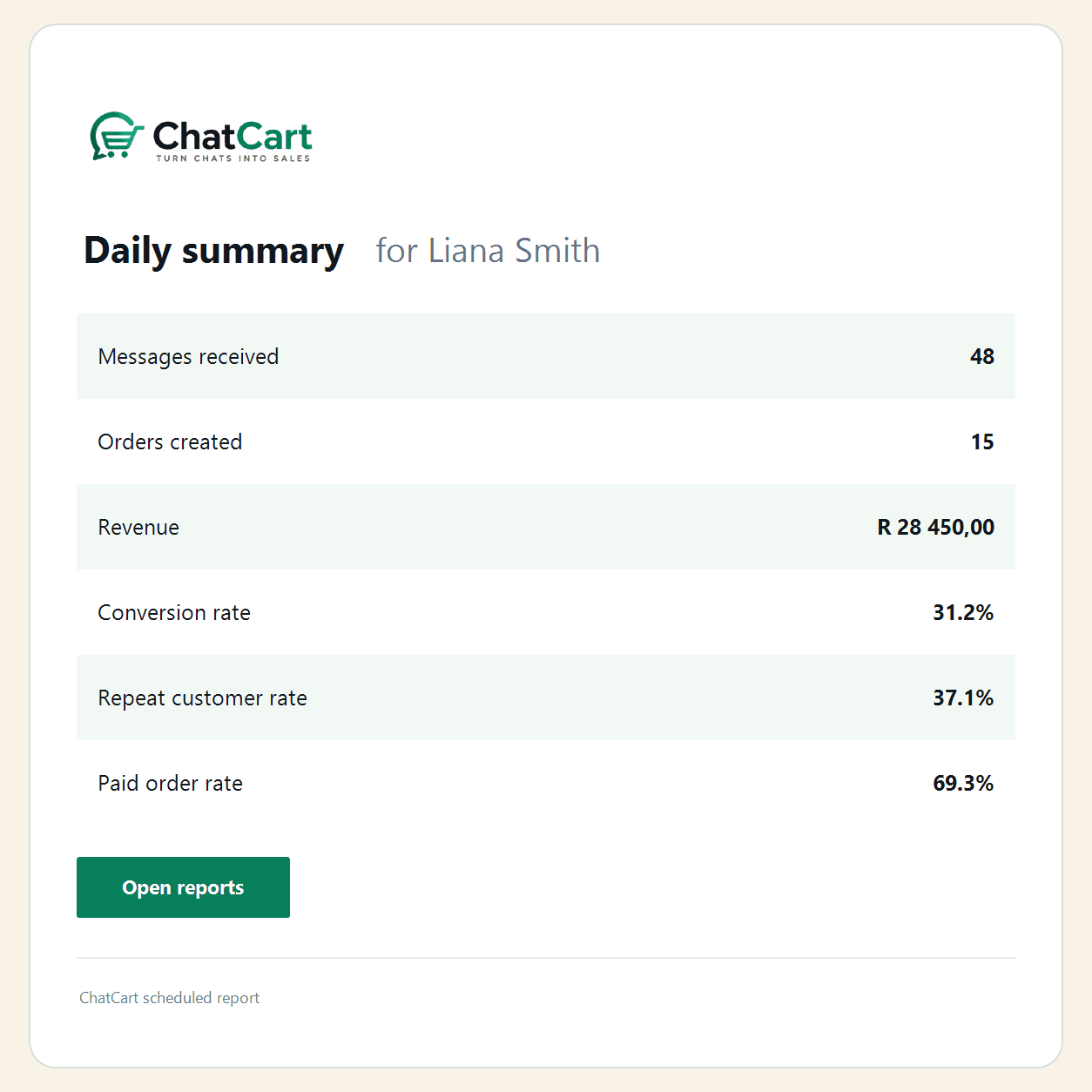
Illustrative report using fictional business data.
Give owners a concise view of today’s customer activity, order output, confirmed revenue, and conversion health before the day slips away.
ChatCart keeps WhatsApp as the customer channel, but the actual business work happens in a shared layer where products, orders, notes, payments, and owner reporting stay visible.
Reply as a team with ownership, notes, and order context attached to the customer conversation.
Keep catalogue items, manual products, delivery fees, and selling context ready for fast quoting and order capture.
Track pending, paid, and dispatched work without digging through old chats or waiting for manual updates.
Sync approved WhatsApp templates and give owners structured visibility into commercial performance over time.
Start with a 14-day trial and choose the workspace package that fits your current sales operation. The pricing is intentionally accessible for early businesses getting live with ChatCart.
A practical workspace for smaller teams getting their WhatsApp sales operation live.
Best for lean teams that need shared conversations, orders, payments, and daily visibility.
Adds more automation, deeper visibility, and stronger operational control for busier teams.
Best for growing teams that need more control, more automation, and owner-level reporting.
Advanced ordering for businesses with one location or multiple branches.
Includes your first 2 active branchesR350/month includes your first 2 active branches. Add more branches for R190/month each.
Get EnterpriseStart with Starter for lean day-to-day operations, or move straight to Growth when you need more automation, more visibility, and stronger operational control. Choose Enterprise for the advanced storefront, QR Ordering, or branch-based operations.
Starter helps you run daily WhatsApp sales operations. Growth adds automation, management reporting, exports, and scheduled summaries for owners who want more control. Enterprise includes everything in Growth, then adds the advanced storefront, QR Ordering, branch routing, and branch reporting.
| What matters | Starter | Growth | Enterprise |
|---|---|---|---|
| Team and operations | 1 named user | Up to 3 named users | Up to 5 users per branch |
| Shared inbox and orders | Included | Included | Included across locations |
| Inventory management | Included | Included | One shared product catalogue |
| Product images | 1 image per product | Up to 3 images per product | Up to 3 images per product |
| WhatsApp templates | Included | Included | Included through one connected number |
| Automations | Manual follow-up only | Rules-based automations included | Rules-based automations included |
| Reporting | Core daily reports | Advanced management reporting | Branch reports and owner visibility |
| Report exports | Not included | PDF exports | PDF exports |
| Scheduled report emails | Not included | Daily, weekly, and monthly summaries | Daily, weekly, and monthly summaries |
| Advanced Storefront | Not included | Not included | Included |
| QR Ordering | Not included | Not included | Included |
| Branch selection | Not included | Not included | Customer choice before catalogue browsing |
| Branch-linked orders | Not included | Not included | Included |
| Billing | Monthly subscription | Monthly subscription | Manual billing with guided onboarding |
Start the 14-day trial, explore the demo workspace, or get launch support if you want a more guided move into live WhatsApp selling.
Need a bit more guidance before you start? See launch assistance.
ChatCart subscription excludes WhatsApp/Meta messaging charges where applicable. We help you keep message usage practical and transparent.
Enterprise includes everything in Growth, plus the advanced storefront, QR Ordering, branch management and reporting, owner visibility, more users, and guided onboarding.
Yes. Enterprise is available to single-location businesses that want its advanced features. The minimum Enterprise subscription is R350/month and includes capacity for up to 2 active branches.
Enterprise Founding Access is R350/month and includes your first 2 active branches, with up to 5 users per branch. Additional active branches are R190/month each.
Create a QR code for a branch and place it on your shop door, counter, table, or marketing material. Customers scan it, browse the catalogue, build their order, and continue through WhatsApp.
Additional active branches are R190/month each. Additional users beyond the included 5 users per branch are R20/user/month. Enterprise billing is currently handled manually.
ChatCart connects to an eligible business number through Meta. A new or spare business number is the safest choice. If your main number already uses WhatsApp Business App, proceed carefully and follow any migration or coexistence instructions Meta presents. Personal WhatsApp Messenger numbers are not a direct ChatCart setup path. ChatCart supports one active WhatsApp number per workspace, so confirm the selected number before completing Meta setup.
Yes. ChatCart is designed for shared inbox workflows so teams can stay aligned on replies, orders, notes, and customer follow-up.
Yes. You can start with a 14-day trial or explore the demo workspace before setting up your own workspace.
ChatCart uses monthly subscriptions with founding pricing for early teams. You can choose the plan that fits your current workflow and upgrade when your operation needs more control.
No. You create your workspace, connect your business number, add products, and follow the onboarding steps. ChatCart is designed to be practical for business teams, not technical teams.
WhatsApp Business is managed through Meta. ChatCart uses Meta's official onboarding flow so you can securely connect your WhatsApp Business account and phone number.
Yes, but usually only once during the initial WhatsApp setup. Because ChatCart connects through Meta's official WhatsApp Business Platform, the business owner or an authorised admin may need to sign in with a Facebook/Meta account during setup. This is used to connect the WhatsApp Business number, confirm business details, complete display-name checks, and handle verification steps where Meta requires them. Your team members do not each need their own Facebook account to use ChatCart. Once setup is complete, invited staff can use ChatCart from the workspace based on their team access. You do not need to post on Facebook, run Facebook ads, or sell through Facebook. Your customers will still communicate with you on WhatsApp, and ChatCart will guide you through the setup process.
Meta asks you to approve permissions so ChatCart can connect your WhatsApp Business account, sync templates, and send or receive messages for your workspace.
No. The Meta step is only used to authorize WhatsApp Business messaging access for your ChatCart workspace.
Meta may ask you to verify your business details or phone number before WhatsApp Business setup can finish. That step comes from Meta and helps confirm the number you want to use.
No. ChatCart guides you through Meta's official onboarding flow without asking you to manage developer IDs or build your own integration.
Yes. ChatCart is designed as self-service software, with optional launch guidance for businesses that want help getting their workspace ready.
Yes. We offer guided onboarding, workspace setup assistance, and help during launch so you do not have to figure everything out alone.